Hey everyone, if you’re running a print shop, you’ve probably stared at a brand new printing press and wondered, “How do I actually make this thing run like it’s supposed to?” I’m Alex, I’ve been selling printing press machinery for 8 years now, and let me tell you—everyone asks the same basic question: what software do these presses even use? No, it’s not just some random app you download to your laptop (wish it was that easy, right?). This stuff is tailored to every part of the printing process, and skipping the right software will turn your “smooth production day” into a headache you don’t need. Let’s break this down like I’d break it down for a new shop owner who’s still figuring out their first full run. Printing Press Machinery
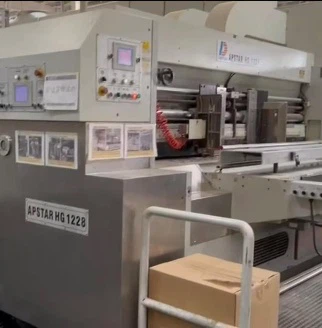
First off, let’s start with the core software that actually controls the press itself—no, not the design software you use to make flyers or business cards. I’m talking about press controller software. Think of this as the press’s brain. A lot of people mix this up with design tools, but they’re totally different. When a designer sends you a PDF of a brochure, you need to prep that file so the press can read it, but the press controller is what tells the press where to put ink, how fast to feed paper, and when to switch between colors. For example, the Heidelberg Printmaster series (which we sell a ton of) uses their proprietary Press Control 5, but we also work with clients who prefer third-party options like Prinect from Heidelberg too—wait, no, Prinect is actually a suite that works with their controllers. Let me get that straight: some press controllers are built-in, but they integrate with prepress software to make the whole thing flow. The key here is that this software handles real-time adjustments. If a page gets off alignment 100 sheets into a run, the press controller will tweak the rollers without you having to hit an emergency stop and waste paper. That’s a huge deal—wasting paper is one of the biggest costs for print shops, so anything that cuts that down saves you cash.
Then there’s prepress software, which is the middleman between design and the press. This is where you take a designer’s file and get it press-ready. A lot of new shop owners try to cut corners here and use basic Adobe stuff like InDesign or Illustrator, but that only works for small, simple jobs. For full-color runs, especially on big offset presses, you need prepress software that handles color profiles, trapping, and plate making. Let’s explain those terms simply: color profiles make sure the blue on a computer screen is the exact same blue that comes off the press. Trapping fixes the tiny gaps between colors where ink doesn’t fully line up, so you don’t get a white line between a red logo and a blue background. Plate making is how you turn your digital file into the metal plates that go on the press to transfer ink. Software like Adobe Acrobat Pro has some prepress tools, but the heavy hitters here are things like Enfocus PitStop Pro, or Caldera for digital presses. Wait, Caldera is big for digital print—if you’re doing short runs of stickers or posters on a digital press instead of offset, Caldera handles the file conversion so the press doesn’t mess up. I had a client last year who tried to use just InDesign for a 5000-sheet flyer run, and they ended up with 200 wasted sheets because the color alignment was off—they switched to PitStop after that, and their waste dropped by 70%. That’s the kind of real stuff I see every day, not just textbook examples.
Next up is automation software, which is the unsung hero of any busy print shop. If you’re running multiple jobs at once—say, a 10,000-sheet catalog, a 2000-sheet batch of business cards, and a 500-sheet postcard run—you don’t want to have to manually load each job into the press. Automation software ties your press controller to your shop’s workflow, so you can queue jobs, switch between them automatically, and even adjust settings mid-run if a job changes. For example, if a client calls and says they need a 10% thicker paper stock for their catalog, the automation software can update the press’s paper feed settings without you having to re-program the whole run. We’ve used Agfa’s Apogee Automation for our own demo presses, and it’s a game changer for shops that do 50+ jobs a week. It also tracks job times, so you can see exactly how long each run takes—no more guessing if you’ll make a deadline for a client. That transparency is huge for keeping customers happy, which is how you get repeat business.
Wait, don’t forget color management software. This is a whole category on its own, and I see so many shops skimp here. If your digital proof (the color swatch you show a client) doesn’t match what comes off the press, you’re in trouble. Color management software calibrates every piece of equipment in your workflow: your monitor, your design software, your prepress tools, and the press itself. The big name here is X-Rite Color iMatch—we install this on almost all our presses, and it takes about an hour to calibrate everything. After that, a red on your screen will be the exact same red on the final product. I had a client last quarter who was losing 15% of their jobs because of color mismatches; after adding X-Rite, that number dropped to 2%. That’s the kind of impact this software has that people don’t talk about until it’s costing them money.
Now, let’s switch gears a bit for digital presses, because the software is a little different there. Digital presses (the ones that print directly onto paper without plates) use raster image processors (RIPs). A RIP turns your digital file into pixels that the press can understand—offset presses use plates, so their software is plate-focused, but digital presses need that pixel breakdown. RIP software like Wasatch SoftRIP or VersaWorks is what drives digital presses like Epson SureColor or HP Indigo. The cool thing about RIPs is that they can handle variable data—like if you’re printing a batch of postcards with each recipient’s name and address on it, the RIP will swap that info automatically without you having to edit each individual card. That’s why digital presses are perfect for personalized marketing materials; the RIP software makes that variation seamless. A lot of new print shops go digital because variable data lets them offer unique services that offset can’t, and the RIP is the backbone of that.
Wait, but what about software that ties everything together for the shop’s back end? Like, if you’re running a print shop, you also need to track quotes, invoices, inventory, and scheduling. That’s shop management software, which integrates with your press and prepress tools. I’ve seen shops that use generic QuickBooks for invoicing, but they end up with mistakes because it doesn’t sync with their press’s job tracking. Proper shop management software like PrintVis or ShopVue integrates with your press controller, so when a job finishes, it automatically updates inventory, sends an invoice, and logs how much paper and ink you used. No more manual data entry, which is where a lot of errors happen. I had a small shop owner tell me last year that he used to spend 10 hours a week just inputting job data; after switching to ShopVue, that time dropped to 2 hours. That’s time he can spend on getting new clients instead of filling out spreadsheets.
Now, let’s talk about what not to do. A lot of shop owners think they can just grab a $50 design software and call it a day, but that’s a recipe for disaster. I’ve seen presses crash because someone uploaded a poorly formatted PDF that basic software couldn’t process. I’ve seen waste go through the roof because color profiles weren’t set up right. The key is to match the software to the type of press you have and the jobs you do. If you’re a small shop doing mostly short-run digital jobs, you don’t need a $10,000 prepress suite—VersaWorks or Wasatch SoftRIP will do the trick. If you’re a big shop doing offset runs, you need that integrated suite with press control, prepress, and color management.
Let me throw in a quick example from last month. A client of ours, a print shop in Chicago, had a problem with their 4-color offset press: the reds were always coming out darker than the proof. We helped them set up X-Rite color management and update their press controller software, and now their color accuracy is spot on. They told us they’ve already recovered the cost of the software in just 2 weeks because they stopped having to re-do runs for color mismatches. That’s the real value here—this software isn’t an extra expense; it’s an investment that cuts waste, saves time, and keeps clients happy.
Now, if you’re shopping for a printing press (or upgrading your existing one), don’t sleep on the software that comes with it. A great press with bad software is just a fancy paperweight. That’s why when we sell a press, we don’t just hand over the machine—we walk you through setting up the controller, prepress tools, and color management, and we’re here if you run into issues. A lot of vendors will sell you a press and leave you to figure out the software on your own, but that’s not how we do it. We’ve got a team that can help you pick the right software for your shop size and job types, so you don’t waste money on stuff you don’t need.
Wait, let’s make sure I didn’t miss any key parts. Oh, right—virtual proofing software. Some clients can’t come to your shop to see a physical proof, so virtual proofing lets you send a digital version of the final product for approval. Software like Adobe Acrobat’s 3D PDF tools or Esko’s ArtiosCAD for packaging lets clients rotate the design, check color, and approve it without you sending physical samples. That speeds up approval time, which means jobs get done faster. I had a client last year who used to wait 3 days for physical proof approvals; now they use virtual proofing, so approvals take a few hours, and their on-time delivery rate went up 20%.
Let’s wrap this up. The software for printing press machinery isn’t one thing—it’s a whole ecosystem. You’ve got the press controller that runs the machine, prepress software that gets files ready, color management that keeps colors consistent, automation that cuts down on manual work, RIPs for digital presses, and shop management that ties everything together. Skipping any part of this will hurt your bottom line, waste paper, and make your life harder.

If you’re looking to upgrade your printing press machinery and want to talk about what software fits your shop best—whether you’re a small start-up or a established shop with 5 presses—hit us up. We’ve worked with hundreds of print shops to match the right press and software combo, so we can help you avoid the mistakes I see new owners make all the time. Don’t let bad software turn your press into a problem; let’s make it work for you.
Water Ink Carton Printing Machine References:
- Printing Industries of America. (2022). Essential Software for Modern Print Production. Print Quarterly Journal.
- X-Rite Inc. (2023). Color Management Best Practices for Commercial Print Shops. Technical Whitepaper.
- Heidelberg Global. (2021). Workflow Automation in Offset and Digital Printing. Industrial Print Magazine.
- VersaWorks Team. (2022). RIP Software for Small to Medium Digital Print Operations. Digital Print Trends Report.
- ShopVue Software. (2023). Shop Management Integration with Press Machinery. Print Solutions Industry Study.
Guangzhou HS Machinery Co., Ltd.
We’re well-known as one of the leading printing press machinery manufacturers and suppliers in China. Please feel free to buy cheap printing press machinery for sale here from our factory. Quality products and low price are available.
Address: Xiaowu 1st Industrial Area, Xiaowu Village, Dongchong Town, Nansha, Guangzhou, China
E-mail: vipmachinery@126.com
WebSite: https://www.cartonboxsolutions.com/
